Uttar Pradesh eTendering Guide: NIC GeGP Portal, EMD & Bid Submission (2026)
Complete guide to bidding on Uttar Pradesh eTendering (etender.up.nic.in). Live tender counts, category breakdown, EMD rules, DSC requirement and step-by-step bid submission for UP works and goods tenders.
On this page
Uttar Pradesh eTendering — where the volume actually is
Uttar Pradesh publishes through the NIC GeGP portal at
https://etender.up.nic.in/nicgep/app. This is the old-Generation eProcurement
platform, not the newer CPPP/GeM stack, so the workflow differs from most
national tenders and catches first-time bidders out.
As of writing, BidBharat tracks 378 live Uttar Pradesh tenders. The category split matters, because it tells you what kind of work you will actually find:
| Category | Live tenders | Typical bidder |
|---|---|---|
| Goods & Services | 236 | Trading firms, authorised dealers |
| Civil Works | 120 | Contractors with PWD/CPWD category registration |
| Electrical | 11 | Licensed electrical contractors |
| Healthcare | 5 | Medical suppliers, hospital vendors |
| Transformers | 3 | Equipment dealers |
Two things stand out. Civil Works is a quarter of UP volume — road construction, nala (drain) work, building repair, and ward-level works run through nagar panchayats as well as departments. And most civil and electrical tenders carry no published estimate value, so you cannot filter by budget on the portal alone.
What is actually listed right now
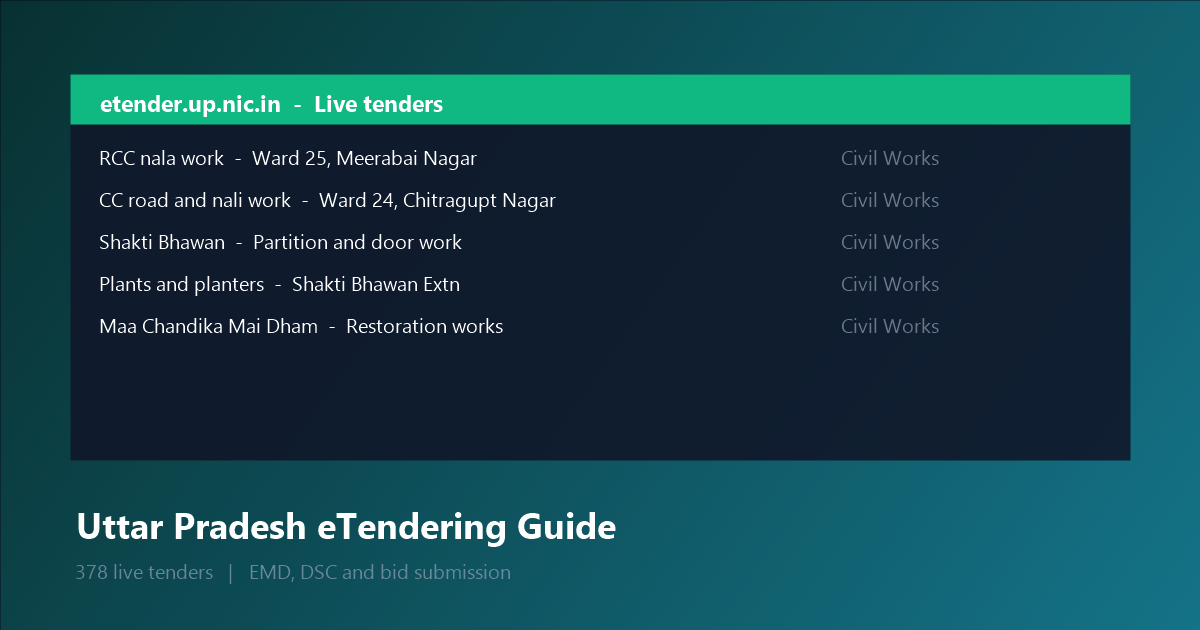
Live examples from the portal, showing the real spread:
- Development, operation and maintenance of the Sant Kabir Textile and Apparel Park at Nagina through PPP (Design, Build, Finance, Operate)
- Full-height partition and door work, room 1301, 13th Floor, Shakti Bhawan, Lucknow
- Upkeeping of plants and planters, Shakti Bhawan Extension, Lucknow
- Ward No 25, Meerabai Nagar — RCC nala nirman karya
- Ward No 24, Chitragupt Nagar — CC road and nali work
- Restoration work at Maa Chandika Mai Dham Mandir, Bahadurganj (Ward 03)
Note the mix: a state-level PPP concession, departmental office maintenance, and small municipal works. UP publishes across three different scales, and a bidder who only looks for large works misses two-thirds of the opportunity.
Before you can bid: three things to sort
1. DSC (Digital Signature Certificate). Mandatory for any bid submission. Buy from any authorised vendor — a Class 3 token or a USB-based DSC both work with the GeGP portal. You cannot register as a bidder without one, and this is the step that causes the most deadline misses because issuance takes 1–3 working days.
2. Registration on the portal.
Go to etender.up.nic.in, use the Registration menu, and complete the
organisation profile. You will need:
- PAN and GSTIN
- Bank account details (the portal verifies by penny-drop)
- Your registration certificate and category details
- Contact person with a working mobile number for OTP
The bank verification is the slow part. A mismatch in account name versus PAN will bounce the registration.
3. The right category certificate. Civil Works tenders almost always require a PWD/CPWD registration certificate in an equivalent category, and your quoted amount must sit inside the category range. Bidding on a ₹25 lakh civil tender with a ₹10 lakh certificate gets rejected at technical evaluation — no appeal.
EMD: what to expect
EMD (Earnest Money Deposit) is a paid security amount submitted with the bid. For UP GeGP tenders it is paid online through the payment gateway on the portal, not by cheque or bank draft.
Two rules that catch people out:
- EMD must be paid on the portal, not transferred separately. A manual bank transfer will not reflect and will invalidate the bid.
- The EMD receipt number is required on the bid form. Pay a little before the deadline — gateway timeouts near the cut-off are common, and the portal does not extend deadlines for payment failures.
Rate: EMD is normally a small percentage of the tender value, and it is refunded after result declaration. For a first-time bidder, treat EMD as working capital, not a cost.
The bid submission sequence
- Download the bid document from
etender.up.nic.inand read the NIT (Notice Inviting Tender) carefully — the NIT sets the submission deadline, validity period and technical criteria. - Prepare your technical bid against the stated eligibility: registration certificate, PAN/GST, audited financials, work-experience certificates, and any mandatory equipment list.
- Prepare the financial bid in the e-procurement system. UP GeGP uses the BOQ (Bill of Quantities) upload, not the rate-card system — enter your rate against each item, and the BOQ total becomes your quoted price.
- Pay EMD online via the portal payment gateway.
- Sign the bid with your DSC. This is the final cryptographic seal; without it the submission is incomplete.
- Submit before the deadline. Do not trust the last hour. UP portals have seen load spikes near cut-off.
Technical vs financial opening — what to expect
UP GeGP opens technical bids first, then financial bids for those who pass.
Passing technical evaluation depends on:
- Experience: completed works of comparable value in the last 3–5 years
- Registration category matching the tender value
- Bid security / EMD validity
- No debarment under the UP debarment list
This is why the category-certificate point above matters more than anything else in this guide. Many technically sound bids are rejected purely on certificate category.
Common reasons UP bids get rejected
Based on the pattern across state GeGP portals:
- Category mismatch — bidding above your registered category ceiling
- Missing EMD receipt on the bid form
- DSC not applied or applied after the deadline
- Financial bid not BOQ-formatted — manual uploads are rejected
- Bid validity shorter than required
- Documents not attested where the NIT demands it
Why use BidBharat for UP
Tracking UP tenders manually is impractical — 378 live at any moment, spread
across departments and nagar panchayats, each with its own deadline. BidBharat
pulls from etender.up.nic.in continuously and flags closing dates so you can
shortlist by category, state and deadline rather than by scrolling a portal.
Filter to Uttar Pradesh, then Civil Works or Goods & Services to match your registration, and set an alert for the categories you actually bid on.
Bid Bharat aggregates publicly available government tender data. Not affiliated with any government body or procurement portal. Verify all details on the official Uttar Pradesh eTendering portal before submitting.